Arduino LESSON 2: Using a Breadboard
Arduino Lesson 2: Using a Breadboard
In this tutorial, we will start to create the first circuit controlled by Arduino. We will start with simple circuits and build them from there. It is important to learn the basics before continuing, and one of the most important basics is how to use the breadboard. In this tutorial, we will explore all the intricacies of the breadboard, and at the end of this tutorial, you will create the first circuit controlled by an Arduino.
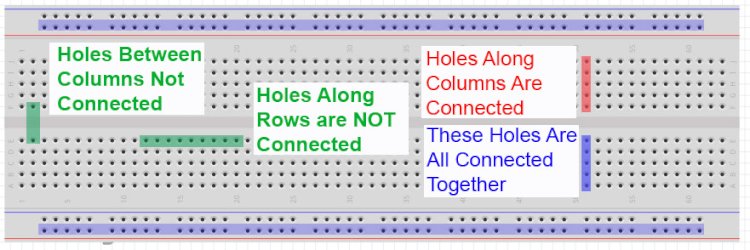
To build a circuit you need to connect the elements of the circuit together. You could run a bunch of wires to connect the components, but you find that you have a nest of rat wires very quickly and it becomes impossible to troubleshoot. To keep your circuit organized you will need to use a breadboard as shown in the picture above. The breadboard allows you to connect the components by inserting them into the small holes. The key is to understand how the holes connect. As you can see from the diagram, the holes in a column (when oriented as shown in the picture) are connected to each other. Therefore, in order to connect the components together, you need to put the cables you want to connect in the same column. Note that the pillars are not connected by the "ditch" in the middle of the board. Also, notice that the long rows at the top and bottom are connected together. They are commonly used to create "rails".They are typically used for ground connections and supply voltages that you may need to connect many components to. Notice that some lines are marked with (+) and others (-). These are just brands.
 Simple LED Circuit for blinking an LED
So let's look at a real-life example. In this circuit we have a power supply that is connected to an LED through a resistor. We need to take this schematic of the circuit and figure out how to connect it in the real world. As mentioned earlier, this. must be done with a breadboard. You can see that you need to connect the power supply to one pin of the resistor. The other pin of the resistor is connected to the LED. Note that the LED is directional which means it needs to be wired in a specific orientation. You need to connect the cathode to the positive voltage. The cathode is typically the longer of the two wires in the LED. If you turn the LED upside down, it will not light up.The other leg of the LED must be connected to the negative pole of the voltage source, for this project we are supplying the voltage of the Arduino microcontroller, in this way we can switch the LED on and off from our program.
Take a look at the diagram at the top of this post to see how the holes on the breadboard connect and how to connect the circuit to the circuit board. There are many ways to connect it, but one that will. Work is shown here.
 This shows how you can hook an LED to the arduino through a current limiting resistor
When you hook your circuit up in real life, it should look something like this:
 Photograph of the circuit. Your LED will not come on until you write your program
Arduino Starter Kit: Although a basic Arduino kit can help you get started, I suggest you buy a starter kit. The projects I show in this tutorial use the components in the kit, and it may be cheaper to get the kit.. .... You purchase a single component on the move. On Amazon, the price of the kit is less than $50.
What's Your Reaction?