Arduino LESSON 11: Arduino Circuit to Dim LED with Potentiometer
Arduino LESSON 11: Arduino Circuit to Dim LED with Potentiometer
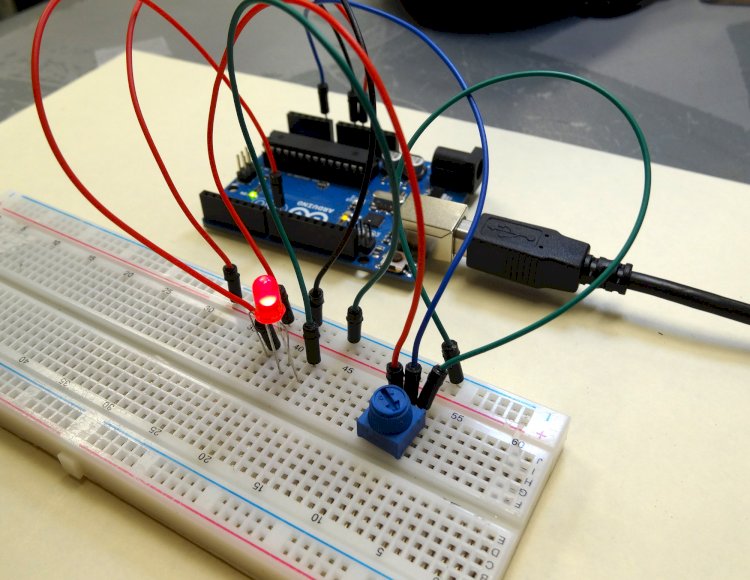
Arduino Circuit for Dimming an LED
Lesson 8 taught you how to write analogue voltages on the Arduiono, and Lesson 10 taught you how to read analogue voltages off the Arduiono. In this lesson, we'll put together what you learned in lessons 8, 9, and 10 to make an LED with adjustable brightness. The brightness will be determined by the potentiometer's position. To do this, we must configure the potentiometer as a voltage divider and power the LED from one of the analogue pins. Pin 9 is used in this example. The circuit diagram I'm using is given below.
 This Schematic Creates a Dimable LED
When connecting the LED to the circuit, keep in mind that the longer leg should always be connected to the positive voltage. In the above example, the larger leg should be linked to the resistor, while the shorter leg should be connected to ground. Remember that we're limiting the current via the LED using a 330 ohm resistor in the circuit.
The aim now is to put everything you've learned in the previous three sessions to work. You'll want to read a value from the potentiometer and then write a voltage to the LED based on the reading. When you read an analogue voltage between 0 and 5 volts, the arduino will report a number between 0 and 1023, with 0 being 0 volts and 1023 representing 5 volts.
Similarly, if you're writing an analogue voltage between 0 and 5 volts, you'll need to include a number between 0 and 255. If you write a "0" value, it equals 0 volts. A value of 255 will result in a voltage of 5 volts. As a result, you must scale your write values between 0 and 255 in order to obtain voltages between 0 and 5 volts.
The hard part now is that we want to dim the LED dependent on the value of the potentiometer. If we read a 0 from the potentiometer, we want to write a 0 that corresponds to a 0 voltage. If we read 1023 from the potentiometer, we'll want to write our maximum voltage of 5 volts, which means we'll need to write 255. Essentially, we must scale our read values, which will be between 0 and 1023, to appropriate write values, which should be between 0 and 255.
This, like the other courses, is a basic linear connection that allows us to use the concepts we acquired in math class. The arithmetic is explained on this sheet:
 We must scale our read values (0 to 1023) to suitable write values (0 to 255).
So, based on the calculations above, the Send Value that we should write to the LED is the value that we are reading from the potentiometer X (255/1023).
We can now write the program now that the math is out of the way. This code is intended for the above-mentioned circuit, in which the potentiometer centre leg is read with pin A0 and the LED is written with pin 9.
int potPin= A0;  //Declare potPin to be analog pin A0
int LEDPin= 9;  // Declare LEDPin to be arduino pin 9
int readValue;  // Use this variable to read Potentiometer
int writeValue; // Use this variable for writing to LED

void setup() {
  pinMode(potPin, INPUT);  //set potPin to be an input
  pinMode(LEDPin, OUTPUT); //set LEDPin to be an OUTPUT
  Serial.begin(9600);      // turn on Serial Port
}

void loop() {

 readValue = analogRead(potPin);  //Read the voltage on the Potentiometer
 writeValue = (255./1023.) * readValue; //Calculate Write Value for LED
 analogWrite(LEDPin, writeValue);      //Write to the LED
 Serial.print("You are writing a value of ");  //for debugging print your values
 Serial.println(writeValue);

}
You should be able to control the brightness of the potentiometer with this code. The voltage from the potentiometer is read, and the value written to the LED is scaled based on the reading from the potentiometer.
What's Your Reaction?